Ansifilter documentation

Ansifilter documentation
ANSI codes are commands embedded in a text stream to add formatting instructions into this text. These codes are interpreted by terminal emulators like xterm or Putty.
Ansifilter parses common ANSI codes to remove them or to convert them to another colored text file format (HTML, TeX, LaTeX, RTF, Pango or BBCode).
Support for ANSI art files (based on codepage 437 and ANSI.SYS sequences or BIN/XBIN/TND files) is enabled with the --art-cp437, --art-bin and --art-tundra options.
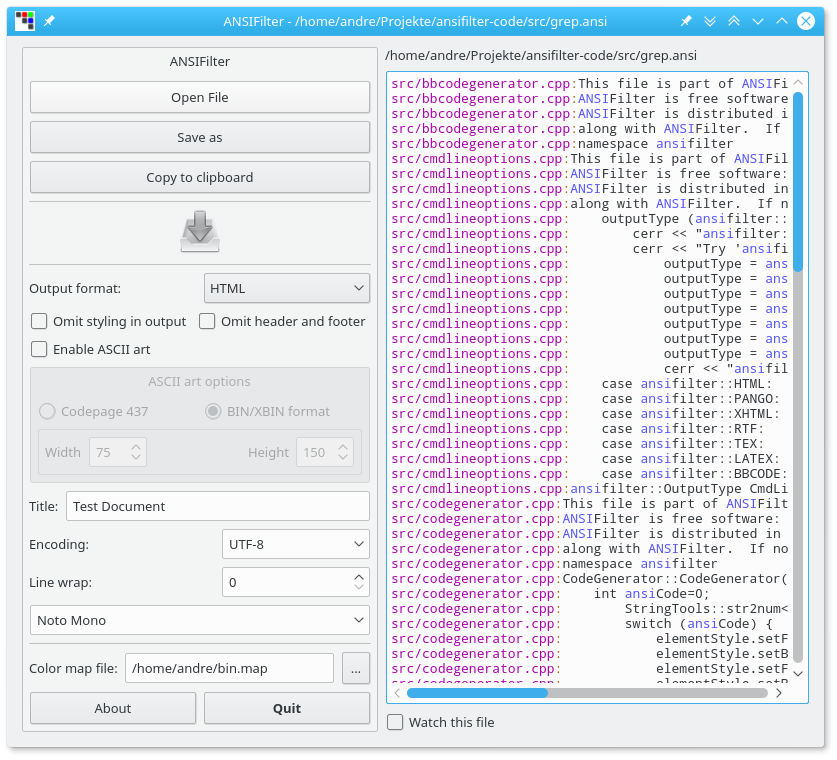
The utility is also available as command line interface:
ansifilter ansifile.txt will give:
Several ANSI codes:
Bold
Underline
Black
Red
Green
Red Background
Green Background
Image inverted and back
ansifilter --html ansifile.txt will give:
Several ANSI codes:
Bold
Underline
Black
Red
Green
Red Background
Green Background
Image inverted and back
Features
These are the options of the command line interface:
File handling:
  -i, --input=<file>     Name of input file
  -o, --output=<file>    Name of output file
  -O, --outdir=<dir>     Name of output directory
  -t, --tail             Continue reading after end-of-file (like tail -f)

Output text formats:
  -T, --text (default)   Output text
  -H, --html             Output HTML
  -M, --pango            Output Pango Markup
  -L, --latex            Output LaTeX
  -P, --tex              Output Plain TeX
  -R, --rtf              Output RTF
  -S, --svg              Output SVG
  -B, --bbcode           Output BBCode

Format options:
  -a, --anchors(=self)   Add HTML line anchors (opt: self referencing, assumes -l)
  -d, --doc-title        Set HTML/LaTeX/SVG document title
  -e, --encoding=<name>  Set HTML/RTF encoding (must match input file encoding);
                         omit encoding information if enc=NONE
  -f, --fragment         Omit HTML header and footer
  -F, --font=<font>      Set HTML/RTF/SVG font face
  -k, --ignore-clear(=0) Do not adhere to clear (ESC K) commands (default: true)
  -l, --line-numbers     Print line numbers in output file
  -m, --map=<path>       Read color mapping file (see README)
  -r, --style-ref=<rf>   Set HTML/TeX/LaTeX/SVG stylesheet path
  -s, --font-size=<fs>   Set HTML/RTF/SVG font size
  -p, --plain            Ignore ANSI formatting information
  -w, --wrap=<len>       Wrap long lines
      --no-trailing-nl   Omit trailing newline
      --no-version-info  Omit version info comment
      --wrap-no-numbers  Omit line numbers of wrapped lines (assumes -l)
      --derived-styles   Output dynamic stylesheets (HTML/SVG)

ANSI art options:
      --art-cp437        Parse codepage 437 ANSI art (HTML and RTF output)
      --art-bin          Parse BIN/XBIN ANSI art (HTML output, no stdin)
      --art-tundra       Parse Tundra ANSI art (HTML output, no stdin)
      --art-width        Set ANSI art width (default 80)
      --art-height       Set ANSI art height (default 150)

SVG output options:
      --height           set image height (units allowed)
      --width            set image width (see --height)

Other options:
  -h, --help             Print help
  -v, --version          Print version and license info

Examples:
ansifilter -i input.ansi -o output.txt
ansifilter *.txt
tail -f server.log | ansifilter

Parsing XBIN files overrides --art-width, --art-height and --map options.
The ANSI art file formats BIN, XBIN and TND cannot be read from stdin.
The GUI version also accepts the first command line argument as input file name.
Ansifilter may simulate tail -f functionality in Windows.
Supported control sequences
Formatting:
Bold, Underline, Italic, Blink
Colors:
Black, Red, Green, Yellow, Blue, Magenta, Cyan, White, xterm 256 color codes
Other:
Conceal/Reveal, Image positive/negative
Environment variables
The command line version recognizes these variables:
ANSIFILTER_OPTIONS: may contain command line options, but no input file paths.
Color mapping
The basic ANSI color set can be adjusted with a color map file (--map option).
This text configuration overrides these color codes:
Normal: Black (0), Red (1), Green (2), Yellow (3), Blue (4), Magenta (5),
        Cyan (6), Gray (7)
Bright: DarkGray (8), Red (9), Green (10), Yellow (11), Blue (12), Magenta (13),
        Cyan (14), White (15)
File format: <0..15> = <HTML color code>
Example file content
1= #0000aa
2= #00aa00
3= #00aaaa
4= #aa0000
5= #aa00aa
6= #aa5500
7= #aaaaaa
8= #555555
9= #5555ff
10= #55ff55
11= #55ffff
12= #ff5555
13= #ff55ff
14= #ffff55
15= #ffffff